Chroma Subsampling Explained
Most of the video you watch carries less color detail than brightness detail.
That sounds like a defect. It is not. It is one of the oldest and most successful tricks in video engineering.
A movie on Blu-ray, a UHD Blu-ray, a streaming show, a broadcast, a YouTube video, and most compressed video files do not usually store full-resolution red, green, and blue information for every pixel. Instead, they separate the picture into a sharp brightness-like channel and two lower-resolution color-difference channels. The brightness detail stays full resolution. The color detail is reduced.
You usually do not notice.
That is the trick.
This piece is about chroma subsampling: why video can throw away some color resolution without falling apart, what ratios like 4:4:4, 4:2:2, and 4:2:0 mean, and when the trick stops being invisible.
The eye's asymmetry
The foundation is simple: human vision sees brightness detail more sharply than color detail.
This is not just a vague statement about taste. It is built into the visual system. The retina, the distribution of cone types, the way signals are combined before they leave the eye, and the way the brain reconstructs images all favor sharp brightness contrast over equally sharp color contrast.
Digital video takes advantage of that asymmetry.
Strictly speaking, the main channel in digital component video is called luma, usually written Y-prime. It is not exactly the same thing as physical luminance. Luminance is a measured quantity of light. Luma is a gamma-encoded video signal derived from weighted red, green, and blue components. But in practical terms, luma carries most of what we experience as brightness detail: edges, texture, shape, contrast, fine structure.
The other two channels are chroma channels, usually Cb and Cr. They carry color-difference information: how the color departs from the luma value.
The eye is much less sensitive to fine spatial detail in those chroma channels. You can blur the color information in a photograph while keeping luma sharp, and the image will still look surprisingly detailed. Do the opposite - blur the luma while keeping color sharp - and the image immediately looks soft.
That asymmetry is the whole bargain.
Brightness needs to be sharp.
Color can be softer.
Color television used this idea long before digital video. Analog color systems such as NTSC, PAL, and SECAM had to fit color information into limited broadcast bandwidth, often while preserving compatibility with black-and-white television. The solution was to keep the brightness information strong and give the color information less bandwidth. The picture still worked because the eye cared more about brightness detail.
Digital video inherited the same idea and formalized it into ratios.
Those ratios are chroma subsampling.
The ratios
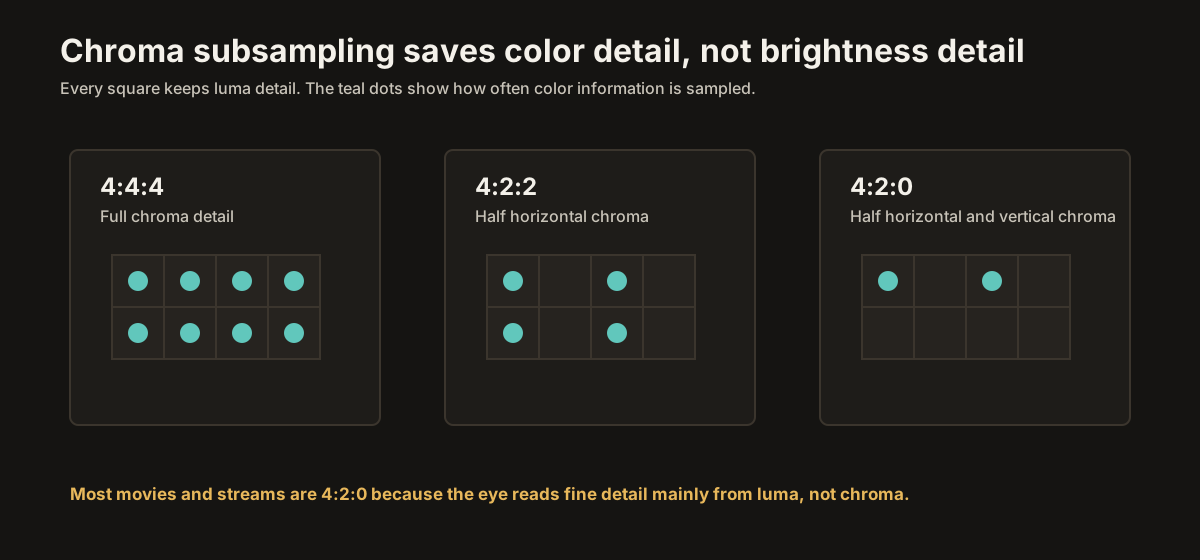
Chroma subsampling ratios are written as three numbers: 4:4:4, 4:2:2, 4:2:0.
The first number refers to luma sampling. In these common formats, the first number is 4, meaning luma is sampled at full horizontal resolution across the reference block.
The second and third numbers describe chroma sampling relative to that luma sampling. The exact notation has historical complications, and chroma sample placement can vary by standard, but the practical meaning is straightforward:
4:4:4 means full-resolution luma and full-resolution chroma.
4:2:2 means full-resolution luma, half horizontal chroma resolution, and full vertical chroma resolution.
4:2:0 means full-resolution luma, half horizontal chroma resolution, and half vertical chroma resolution.
That is the useful version.
In 4:4:4, every pixel has its own luma and full chroma information. No chroma resolution has been discarded. RGB video is effectively full chroma by nature, because it carries red, green, and blue at every pixel.
In 4:2:2, the color information is sampled at half the horizontal resolution. Two neighboring pixels share chroma information, but each scan line still has its own chroma samples vertically. This saves bandwidth while preserving more chroma detail than 4:2:0. It is common in professional video workflows, cameras, recorders, editing formats, and broadcast contribution systems.
In 4:2:0, the color information is sampled at half horizontal and half vertical resolution. A 2x2 block of luma samples effectively shares one set of chroma samples. That means each chroma plane has one quarter as many samples as the luma plane.
This is the format of most consumer video distribution.
The data savings are large. Compared with 4:4:4, 4:2:0 keeps full luma but reduces each chroma channel to one quarter resolution. Across luma plus two chroma channels, the total sample count is roughly half of 4:4:4.
That is an enormous gain for storage and bandwidth.
And on natural images, the perceptual cost is usually small.
Where it works
Chroma subsampling works best on photographic and cinematic images.
Faces. Landscapes. Rooms. Clothing. Trees. Streets. Skin. Clouds. Smoke. Film grain. Camera noise. Natural textures.
In those images, the fine detail we care about mostly lives in luma. Edges are carried by brightness contrast. Texture is carried by brightness variation. Color usually changes more slowly across the image. Even when color changes sharply, real camera systems, lenses, demosaicing, compression, motion blur, depth of field, and grading tend to soften the transitions enough that 4:2:0 survives well.
That is why movies and TV shows can be distributed in 4:2:0 and still look excellent.
A UHD Blu-ray can be 4:2:0 and still look pristine. A high-quality stream can be 4:2:0 and still look sharp. The picture is not sharp because every color channel is full resolution. It is sharp because the luma channel is full resolution, and the eye builds detail mainly from luma.
This is one of the reasons consumer video can exist at manageable bitrates. Full-resolution chroma would cost a lot of data for very little visible improvement in most real video content.
For movies and television, 4:2:0 is not a scandal.
It is the normal bargain.
Where it breaks
The bargain fails when the image is not photographic.
Chroma subsampling becomes visible on sharp, synthetic, high-contrast color edges. The classic example is small colored text on a contrasting background.
Imagine red text on a dark background, or blue text on gray, or a thin colored line in a chart. The luma channel may describe the shape of the letters cleanly, but the chroma channels are lower resolution. The color does not line up with the edge as precisely as the brightness does. The result is soft color fringing, fuzzy edges, or smeared-looking text.
The shape is sharp.
The color is not.
That mismatch is easy to see on computer desktops. Menus, icons, browser text, spreadsheets, colored UI elements, charts, thin lines, and game HUDs all contain hard-edged synthetic color transitions. Those are exactly the places where 4:2:0 looks worst.
This is why a TV used as a computer monitor can look slightly wrong if it is not receiving 4:4:4 or RGB. Small text may be readable but soft. Colored text may have fringes. Fine UI details may not look as crisp as they should.
It can also matter in games, especially games with fine HUDs, menus, neon UI elements, thin colored outlines, or text-heavy interfaces. During normal gameplay, the difference may be minor. In menus and HUDs, it can be obvious.
Movies almost never need 4:4:4 at the display input because the source is already 4:2:0 and the content is not full of razor-edged UI text. Computers often do need it.
That is the practical dividing line.
Video can live happily with 4:2:0.
Text wants 4:4:4.
The setting in your menu
Most modern TVs can accept full-chroma input on at least some HDMI ports, but they may not do it automatically in every mode.
The setting names vary wildly.
It may be called PC Mode, Input Label: PC, HDMI Deep Color, HDMI Ultra HD Color, Enhanced Format, Input Signal Plus, 4K Enhanced, HDMI Signal Format, Game Mode, Chroma 4:4:4, or something similar.
These settings are not all identical, but they often overlap. Some increase the HDMI bandwidth the input will accept. Some change the way the TV handles the signal internally. Some disable video processing. Some tell the source device, through HDMI negotiation, that the input can accept RGB or YCbCr 4:4:4 at the requested resolution and refresh rate.
The practical result is what matters: for a PC input, you want the TV and source configured so the signal reaches the display as RGB or 4:4:4.
That usually means:
Set the TV input to PC mode or label it as PC if your TV uses input labels to enable full chroma.
Enable the enhanced HDMI format on that input if the TV requires it.
Set the computer or console to output RGB or YCbCr 4:4:4 when bandwidth allows.
Use the correct HDMI cable for the resolution, refresh rate, bit depth, and chroma format you are trying to send.
For a streaming stick, Blu-ray player, cable box, or normal movie source, you usually do not need to force 4:4:4. The source content is almost always 4:2:0, and the TV knows how to upsample chroma internally before displaying it. Forcing a different output format may not improve the image, and in some cases it can add unnecessary conversion or create range mismatches.
Use full chroma where it matters.
Do not chase it where it does not.
RGB versus YCbCr
There is another menu choice that often appears near chroma settings: RGB versus YCbCr.
RGB carries red, green, and blue channels directly. It is full-resolution color by definition. There is no chroma subsampling in RGB.
YCbCr separates the signal into luma and two chroma channels. It can be 4:4:4, 4:2:2, or 4:2:0.
For a PC desktop, RGB is usually the cleanest choice. It maps naturally to computer graphics, preserves full chroma, and avoids an unnecessary conversion step. You also need to make sure the range is correct: RGB Full with a TV or monitor expecting Full, or RGB Limited with a display expecting Limited. A mismatch here causes crushed blacks or washed-out blacks.
For movies and TV, YCbCr is normal. Most video is encoded that way already. A UHD Blu-ray or streaming movie is usually 4:2:0 YCbCr before the player and TV do their internal conversions. Letting the video chain handle that normally is usually fine.
For game consoles, either can be correct depending on the console, TV, resolution, refresh rate, HDR mode, and bandwidth. RGB or 4:4:4 is best for UI clarity when available. But in HDR at high refresh rates, bandwidth limits may force a compromise. In those cases, preserving HDR bit depth and refresh rate may matter more than preserving full chroma, especially for normal gameplay.
The right answer depends on what you are doing.
Desktop text: prioritize RGB or 4:4:4.
Movies and shows: 4:2:0 is normal.
Games: use RGB or 4:4:4 when bandwidth allows, but do not panic if the console uses 4:2:2 or 4:2:0 for some HDR/high-refresh modes.
Bandwidth tradeoffs
Full chroma costs bandwidth.
That is why chroma subsampling exists in the first place.
At 1080p or 4K24, the bandwidth problem is usually mild. At 4K60, 4K120, HDR, 10-bit color, and full chroma, the bandwidth demand rises quickly.
This is where HDMI versions and cable certification matter.
Premium High Speed HDMI cables are certified for 18Gbps, enough for many 4K60 HDR uses. Ultra High Speed HDMI cables are certified for up to 48Gbps, the bandwidth associated with HDMI 2.1-class features such as 4K120, higher refresh rates, and more demanding full-chroma formats.
The important point is that "4K HDR" is not one bandwidth number. The actual requirement depends on resolution, refresh rate, bit depth, chroma format, and whether compression such as DSC is involved.
A 4K24 movie in HDR is easy compared with a 4K120 HDR game.
A 4K60 4:2:0 signal is much easier than a 4K60 RGB or 4:4:4 10-bit signal.
A 4K120 10-bit RGB gaming signal needs far more bandwidth than either.
So when a device cannot fit everything at once, it has to compromise. It might lower chroma resolution. It might lower bit depth. It might lower refresh rate. It might use compression. It might refuse the mode entirely.
This is why the same console can show different output formats depending on the TV port, cable, receiver, refresh rate, and HDR setting.
If text clarity is the priority, choose RGB or 4:4:4.
If HDR movie playback is the priority, 4:2:0 or 4:2:2 may be perfectly fine.
If high-refresh HDR gaming is the priority, make sure the whole chain supports the required bandwidth: source, cable, receiver or soundbar, and TV input.
PC Mode and Game Mode
PC Mode and Game Mode are often discussed together, but they are not always the same thing.
Game Mode usually reduces input lag by disabling motion interpolation and other slow processing. On many TVs, it may also allow 4:4:4 or RGB input, especially when paired with the right HDMI format setting.
PC Mode usually focuses on pixel accuracy and chroma clarity. It tells the TV to treat the signal like computer graphics rather than video. That often means full chroma, minimal scaling tricks, less edge enhancement, and fewer picture-processing features.
For a computer desktop, PC Mode is usually what you want.
For a game console, Game Mode is usually what you want, and you may also want full chroma if the TV supports it cleanly.
For movies, neither is automatically better. Movie, Cinema, Filmmaker, or calibrated modes are usually better starting points because they are designed around video standards, correct color temperature, proper gamma or EOTF behavior, and appropriate processing assumptions.
The rule is not "PC Mode is best."
The rule is "use the mode designed for the source."
A PC should look like a PC.
A movie should look like a movie.
A game should be responsive and, where possible, cleanly rendered.
What your TV does next
Even when the source sends 4:2:0, the panel does not literally display quarter-resolution color.
The TV has to upsample the chroma before it drives the display. That process is called chroma upsampling. The TV reconstructs missing chroma samples and converts the signal into whatever internal format it uses to drive the panel.
This step matters.
Good chroma upsampling is almost invisible on normal video. Bad chroma upsampling can create color fringes, jagged chroma edges, or other artifacts. In the DVD era, "chroma upsampling error" was a real and visible flaw on some players. Modern TVs and players are generally much better, but the reconstruction step is still there.
This is another reason not to think of 4:2:0 as simply "bad."
A well-produced 4:2:0 video signal, decoded and upsampled well, can look excellent. The reduced chroma resolution is part of the compression system. The reconstruction is part of playback.
The question is not whether chroma was subsampled.
The question is whether that subsampling is appropriate for the content.
For movies, yes.
For desktop text, no.
Where this leaves us
Chroma subsampling is one of video's best bargains.
The human visual system sees brightness detail more sharply than color detail. Video takes advantage of that by keeping luma sharp and reducing chroma resolution. That saves enormous bandwidth and storage with little visible cost on natural images.
4:4:4 keeps full chroma.
4:2:2 halves chroma horizontally.
4:2:0 halves chroma horizontally and vertically.
Most consumer video is 4:2:0, and that is fine. Blu-rays, UHD Blu-rays, streaming movies, broadcasts, and ordinary television content are built around that assumption. Your TV knows how to handle it.
The place where 4:2:0 becomes a problem is synthetic detail: small text, computer desktops, thin colored lines, UI elements, charts, and some game HUDs. Those need full chroma to look crisp.
So the practical advice is simple.
Leave movie and TV sources alone.
For a PC, use RGB or 4:4:4 and enable the TV's PC/input mode that preserves full chroma.
For games, use Game Mode and full chroma when available, but understand that HDR, high refresh rates, and bandwidth may force tradeoffs.
Use a certified HDMI cable appropriate to the signal you are trying to send.
Do not worry about 4:2:0 for movies.
Do worry about it for text.
That is the whole trick: video throws away color detail where your eye is least likely to miss it. Most of the time, the trick works beautifully. The one time it does not is when the picture stops behaving like video and starts behaving like a computer screen.
That is when you turn the trick off.
Next: HDR Formats Explained Move from signal format into HDR10, HDR10+, Dolby Vision, HLG, and the metadata that guides tone mapping.