Bits, Banding, and Why HDR Wants 10
Watch a sunset on streaming.
The sky fades from deep orange at the horizon through pink, gold, and pale blue toward the top of the frame. If the signal is clean and the encoding is generous, the gradient looks continuous. The colors melt into one another without calling attention to the machinery underneath.
If the signal is not clean, you see something else.
The sky breaks into bands: flat strips of slightly different color, each one separated from the next by a visible step. A smooth gradient becomes a stack of contours. The same thing can happen in dark scenes - a night sky, a foggy wall, a fade to black - where instead of a gentle transition, you see rings of gray, blue, or near-black.
Once you notice banding, it is hard to unsee.
The question is where it comes from, why some content shows it and some does not, and what bit depth has to do with it.
This piece is about signal precision: how many distinct values exist between dark and bright, why 8-bit SDR mostly worked for decades, and why HDR needs more.
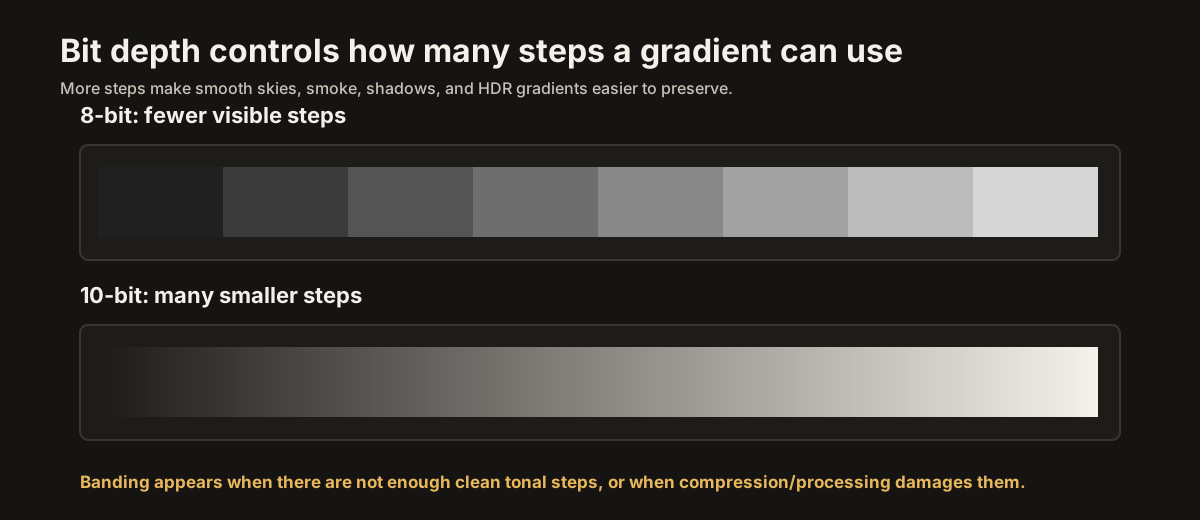
Bit depth is only one part of the signal chain; HDR formats and color space determine what those extra code values are trying to describe.
Counting the steps
A digital video signal represents each color channel with numbers.
In simple terms, 8 bits per channel gives 256 possible values. Ten bits gives 1,024. Twelve bits gives 4,096. Those are the raw mathematical counts: 2 to the 8th, 2 to the 10th, 2 to the 12th.
Real video systems are a little messier. Many video formats use limited or legal ranges rather than the entire numerical range for active picture information. In 8-bit video, for example, picture black and white are often mapped to a narrower range than 0 through 255. In 10-bit video, the equivalent limited range uses more code values but still reserves some values for headroom, footroom, and signaling.
The exact range depends on the format, but the principle is the same: more bits means more available steps.
Those steps are evenly spaced as code values. They are not evenly spaced as light.
That distinction matters.
A transfer function - gamma in SDR, PQ or HLG in HDR - maps those code values into display brightness. The curve is deliberately nonlinear because human vision is nonlinear. We need more precision in some parts of the brightness range than others.
So the practical question is not just "how many steps are there?"
The better question is: are the steps small enough that the viewer does not see them?
If adjacent code values produce light levels that are too far apart, the eye can detect the jump. That visible jump is banding.
Why 8-bit SDR mostly worked
For SDR, 8-bit video was good enough most of the time.
That does not mean 8-bit is perfect. It never was. Smooth skies, mist, studio backdrops, animation gradients, and very dark scenes can expose the limits of 8-bit encoding. Compression can make those limits worse. Poor processing can make them worse still.
But SDR had one big advantage: its brightness range was modest.
A traditional SDR reference image is built around a 100-nit reference white. The signal does not need to describe 1,000-nit sparks, 4,000-nit reflections, or 10,000-nit theoretical highlights. It only has to describe a relatively narrow range from black to SDR white, with gamma distributing the values in a visually useful way.
Within that world, 8 bits per channel was an acceptable compromise.
Not flawless. Acceptable.
It gave enough precision for most pictures, most displays, most viewing conditions, and most content. Dither and noise often helped hide the limits. Film grain, texture, camera noise, and compression noise could all break up otherwise visible steps. A perfectly smooth synthetic gradient might show the weakness, but ordinary video often had enough texture to mask it.
That is why 8-bit SDR survived for so long.
It worked because the range was small, the transfer curve was appropriate, and the flaws were often hidden by the content itself.
Why HDR needs more
HDR changes the problem.
HDR is not merely SDR made brighter. HDR asks the signal to describe a much larger brightness range. PQ can represent luminance values up to 10,000 nits. Actual HDR content is usually mastered far below that ceiling, often around 1,000 or 4,000 nits depending on the mastering display, but the range is still much larger than SDR.
Try to describe that larger range with only 8 bits and the steps become too coarse.
A smooth highlight gradient has fewer levels available. A sunset has fewer intermediate shades. A dark-to-bright transition has more distance to cover with the same number of rungs on the ladder. The result is more visible contouring, especially in broad gradients and compressed streams.
This is why HDR10 is a 10-bit format.
Ten bits does not make banding impossible. Compression can still cause it. Poor mastering can still cause it. Bad app output, weak processing, or panel limitations can still reveal it. But 10-bit gives the signal four times as many code values per channel as 8-bit. That extra precision is essential for HDR's wider range.
Twelve bits gives still more room: 4,096 values per channel. It is useful in production, intermediate processing, professional workflows, and some Dolby Vision pipelines. More precision gives the system more margin before visible contouring becomes a problem.
For consumer HDR delivery, 10-bit is the normal baseline. For production and high-end processing, 12-bit is better.
The key point is simple:
8-bit was enough for much SDR.
HDR wants 10 at minimum.
What banding actually is
A real gradient is continuous.
The brightness of the sky does not move from one value to another in visible jumps. It changes smoothly. Physical light can vary in tiny increments far beyond what a digital signal can directly store.
A digital image has to approximate that smoothness with discrete values.
If the signal has enough values, the approximation looks smooth. The jumps are too small to see. Your eye accepts the gradient as continuous.
If the signal does not have enough values, the approximation breaks. A region assigned one code value looks flat. The next region, assigned the next code value, looks slightly brighter or slightly different in color. The boundary between them becomes visible.
That is banding.
Banding is easiest to see where the image gives it nowhere to hide: skies, fog, smoke, blank walls, soft shadows, out-of-focus backgrounds, animated gradients, and slow fades. It is especially noticeable when the display is large, sharp, high-contrast, and viewed in a dim room.
A small phone in bright daylight can hide ugly banding. A large OLED in a dark room will expose it.
There is a related word, posterization. People sometimes use it interchangeably with banding. More strictly, posterization describes the broader effect of reducing a smooth tonal image into too few visible levels, producing a flattened, graphic, poster-like look. Banding is the contour-line version of the same underlying problem: not enough usable steps to describe a smooth transition.
Dither
There is a trick that helps.
It is called dither.
Suppose a source image has more precision than the final signal can carry. A 10-bit master might need to be converted to 8-bit. If the encoder simply rounds every value to the nearest available code, smooth gradients can turn into visible bands.
Dither handles the conversion more gracefully.
Instead of rounding every pixel in the same hard way, the system adds carefully controlled noise before quantization. That noise changes the rounding decisions from pixel to pixel. A region that should sit between code values 137 and 138 becomes a fine-grained mix of 137s and 138s. Seen from normal distance, the eye blends the mixture into the impression of an intermediate value.
The band becomes texture.
That is the trade.
Dither replaces hard contour lines with fine noise. Done well, it looks much better. The image may gain a faint grain-like texture, but the gradient stays visually smooth. Done badly, it can look noisy, crawling, patterned, or still banded.
Dither is one reason 8-bit video often looks better than the raw number suggests. It is also one reason compression can make banding worse. Compression may smooth away or distort the dither pattern that was hiding the quantization steps. Once the dither is damaged, the bands return.
This is why the same movie can look cleaner on disc than on a low-bitrate stream. UHD Blu-ray usually delivers higher bitrate video with less aggressive compression. Streaming has to survive bandwidth limits, device differences, and adaptive quality changes. The master may be good. The path to your screen may not be.
Signal bit depth versus panel bit depth
There are two different bit depths people often confuse.
Signal bit depth is the precision of the video signal arriving at the TV: 8-bit, 10-bit, or 12-bit per channel.
Panel bit depth is the precision the display hardware can produce or approximate.
They are related, but they are not the same thing.
A TV may accept a 10-bit HDR signal even if the panel itself is not a native 10-bit panel. Some panels use 8-bit plus FRC, or frame rate control, which is a form of temporal dithering that flickers between nearby values quickly enough to approximate intermediate levels. Done well, 8-bit plus FRC can look close to native 10-bit in normal viewing. Done poorly, it can show noise, flicker, or contouring in difficult gradients.
A native 10-bit panel can produce more levels directly. That is better in principle, especially for HDR. But panel bit depth is only one part of the chain. Processing quality, tone mapping, compression, local dimming, near-black handling, and dithering all matter too.
Consumer marketing can be vague here. A TV may advertise HDR10 support because it accepts and processes HDR10 signals. That does not always tell you whether the panel is native 10-bit, 8-bit plus FRC, or something else. Reviewers sometimes investigate this, but manufacturers do not always state it plainly.
For most viewers, the more important practical issue is the signal path.
If a 10-bit HDR signal gets reduced to 8-bit before it reaches the TV, the panel cannot recover the missing precision. A native 10-bit panel cannot display code values that were discarded upstream. The signal has to arrive intact.
That is where HDMI settings matter.
The setting in your menu
Somewhere in your TV's input settings, there may be a setting that controls the HDMI signal format.
The name varies by brand. It might be called HDMI Deep Color, HDMI Ultra HD Color, Input Signal Plus, Enhanced Format, 4K HDR Color, HDMI Signal Format, or something similar.
The purpose is broadly the same: it lets the HDMI input accept higher-bandwidth video formats, including combinations of 4K resolution, HDR, higher refresh rates, wider color spaces, and deeper color.
Manufacturers sometimes leave this setting off by default for compatibility. Older cables, older receivers, long cable runs, or older source devices may have trouble with the highest-bandwidth modes. A conservative setting makes it more likely that a picture appears at all. The downside is that the conservative setting may limit the signal.
For modern HDR sources, you usually want the enhanced setting enabled on the HDMI inputs that need it.
That includes UHD Blu-ray players, HDR streaming boxes, modern game consoles, and PCs used for 4K HDR. If the input is left in a basic mode, the source may be forced into a lower-quality format, a lower refresh rate, reduced chroma, or reduced bit depth.
The exact result depends on the device. Sometimes HDR will not engage at all. Sometimes the picture will work but with limitations. Sometimes the source will choose a compromise format that hides the problem unless you inspect the output settings.
A one-time check is worth doing.
On the TV, enable the enhanced HDMI format for HDR sources.
On the source device, make sure HDR output, 10-bit output, and the appropriate resolution/refresh-rate options are enabled.
If there is an AV receiver or soundbar in the middle, make sure it also supports and passes the full format.
If enabling the setting causes black screens, flickering, sparkles, dropouts, or intermittent signal loss, the most likely culprit is bandwidth somewhere in the chain. It may be the cable. It may be the receiver. It may be an adapter, switch, wall plate, or long run.
For typical 4K HDR at up to 60 Hz, a certified Premium High Speed HDMI cable is the safe target. For 4K HDR at 120 Hz, variable refresh rate, or 8K formats, use a certified Ultra High Speed HDMI cable. You do not need an expensive luxury cable. You need the correct certified cable for the bandwidth.
The point is not to buy more cable than you need.
The point is to avoid quietly starving the signal.
What you can and cannot fix
Bit depth problems can enter the chain at several places.
If the original content was mastered or encoded with visible banding, your TV cannot truly fix it. It may have a smooth-gradation feature that blurs or processes the bands, but that is a repair attempt, not the original precision restored.
If the streaming service sends a low-bitrate version, your TV cannot invent the missing information perfectly. A better connection or higher-quality source may help.
If the HDMI chain is downconverting the signal, that is something you can fix. Enable the correct HDMI input mode, check the source settings, and use a certified cable.
If the TV panel or processing is the weak link, the fix may be limited. Some TVs are simply better than others at gradients, dithering, near-black handling, and HDR tone mapping.
This is why banding is frustrating. It can come from the master, the encode, the stream, the device, the cable, the TV settings, the panel, or the processing. The visible artifact looks simple, but the cause may be anywhere in the chain.
Still, the practical rule is clear:
Preserve the highest bit depth the content was authored with for as long as possible.
For SDR, that often means 8-bit is fine.
For HDR, that means 10-bit should reach the TV.
Where this leaves us
Bit depth is the precision of the signal.
Eight bits gives 256 possible values per channel. Ten bits gives 1,024. Twelve bits gives 4,096. Those numbers are simple, but their consequences are visible. Too few usable values across a smooth gradient produce banding. Enough values make the steps disappear into the picture.
SDR mostly survived on 8-bit because its brightness range was modest and the transfer curve was well matched to the system.
HDR needs more because its brightness range is larger, its gradients can be more demanding, and its highlights and shadows leave less room for coarse quantization.
Dither can hide some limits. Compression can reveal them again. Panel processing can help or hurt. HDMI settings can preserve the intended signal or quietly reduce it before the TV ever gets a chance.
So the practical advice is simple.
Use 10-bit for HDR.
Enable the enhanced HDMI format on the TV input.
Set the source device to output HDR correctly.
Use a certified cable appropriate to the bandwidth.
Then leave the signal alone.
The goal is not to chase the biggest number in every menu. The goal is to keep the picture from losing precision before it reaches the screen.
Banding is what happens when the ladder has too few rungs.
Bit depth is how many rungs the signal gets.
Next: Chroma Subsampling Explained Move from signal precision into the color-resolution bargain behind 4:4:4, 4:2:2, and 4:2:0.