HDR tone mapping explained: this page is about how the TV translates HDR brightness, highlights, and metadata into what the panel can actually show. It is an explainer of display behavior, not a menu setup checklist.
For practical menu choices, use the HDR TV settings checklist.
An HDR signal arrives at your television asking for something the panel may not be able to do.
A highlight in the image may be encoded as 3,500 nits. Your TV may be able to reach 800 nits, or 1,200, or 1,500, and only in a small part of the screen for a limited time. The signal is asking for a brightness the hardware cannot physically produce.
Something has to happen.
That "something" is tone mapping.
Tone mapping is the hidden engine of HDR playback. It is the process that decides what to do when the content asks for more brightness, more color volume, or more highlight range than the display can deliver. It is one of the biggest reasons the same HDR movie can look stunning on one TV, merely good on another, and flat or clipped on a third.
Peak brightness matters. Black level matters. Color gamut matters. But in HDR, none of those numbers matter much unless the TV knows how to use them.
This piece is about that decision: what tone mapping does, what the bad alternatives are, why metadata helps, why TVs differ so much, and what the tone-mapping settings in your menu are actually asking you to choose.
The problem stated plainly
SDR and HDR do not ask the same thing from a display.
SDR is mostly relative. The signal describes values between black and white, and the display maps those values into its own range. The system assumes a reference environment and reference behavior, but the consumer display is not usually being asked to hit a specific luminance for every pixel in the same way.
PQ-based HDR is different.
PQ maps signal values to absolute luminance values. A highlight can be encoded as 400 nits, 1,000 nits, 4,000 nits, or more. The signal is no longer merely asking for "bright relative to the rest of the picture." It is asking for a specific brightness.
That creates the central problem of HDR playback.
The content may be mastered on a display capable of 1,000 or 4,000 nits. The PQ system itself can describe values up to 10,000 nits. Your TV may not be able to reach those values. Even if it can hit a high number in a small test window, it may not be able to sustain that brightness across a larger part of the image.
So the display has to translate.
It has to take the brightness range of the content and fit it into the brightness range of the panel while preserving as much of the original image as possible.
That translation is tone mapping.
The bad answer: clipping
The simplest response is clipping.
If the TV can produce 1,000 nits, then everything at or below 1,000 nits is shown normally. Everything above 1,000 nits is pinned to 1,000.
Mathematically, that is easy.
Visually, it is ugly.
Imagine a bright reflection on a chrome bumper. In the HDR master, that reflection may have shape: 1,200 nits around the edge, 2,000 nits through the middle, 3,500 nits at the specular peak. Those values create form. They make the metal look polished, curved, and reflective.
Hard clipping collapses them.
Everything above the display's limit becomes the same brightness. The highlight loses internal detail. The chrome turns into a flat white patch. A bright window becomes a featureless rectangle. A cloud loses texture. Fire turns into a blob. A stained-glass panel loses the variation that made it look like glass instead of a poster.
Clipping preserves the rest of the image, but it destroys anything above the ceiling.
That is not good enough for HDR.
The other bad answer: scaling everything down
The opposite approach is to scale the whole picture down.
Suppose the content peaks at 4,000 nits and the TV peaks at 1,000. Divide everything by four. A 4,000-nit highlight becomes 1,000. A 2,000-nit highlight becomes 500. A 400-nit object becomes 100. Nothing clips. The relationships are preserved.
But now the whole picture is too dark.
The midtones, which the TV could have displayed just fine, have been dimmed to make room for highlights. Shadows become harder to see. Faces lose life. The entire image feels underexposed. The highlights survive, but the rest of the picture pays for them.
That is not good enough either.
Hard clipping protects the midtones and sacrifices the highlights.
Uniform scaling protects the highlight structure and sacrifices the whole picture.
Tone mapping exists because neither extreme works.
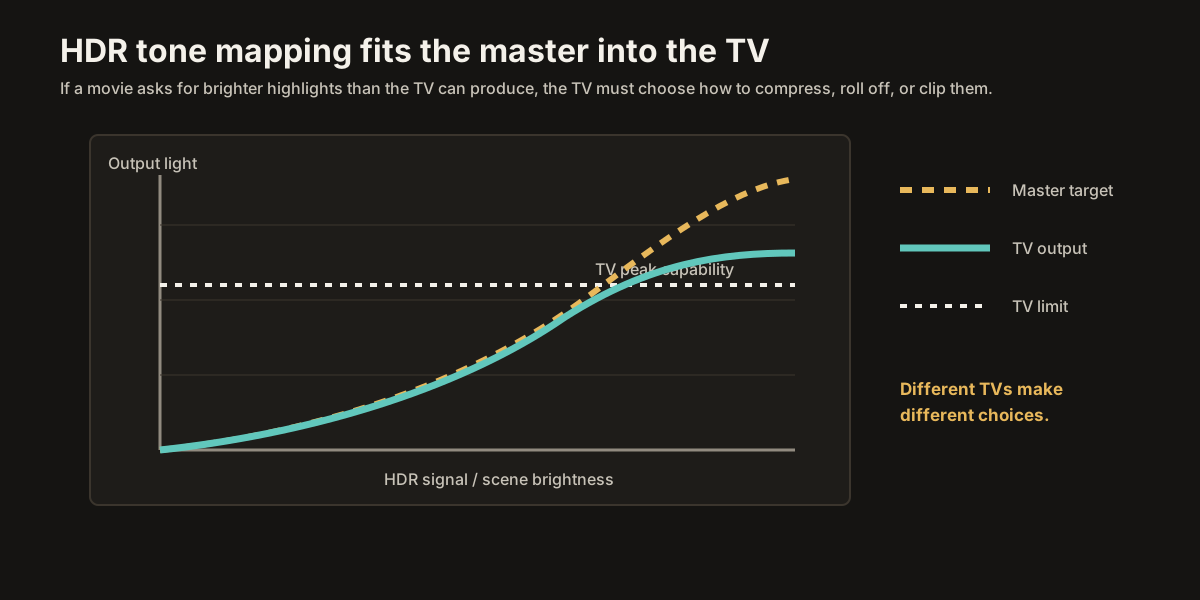
The real answer: a curve
Good tone mapping is nonlinear.
Instead of clipping everything above the display's limit, and instead of dimming the whole image equally, the TV uses a curve.
The lower and middle parts of the image may be preserved closely, especially where the display can reproduce the requested brightness. As the signal approaches the display's limits, the curve begins to bend. Bright highlights are compressed into the available range. The brightest values are rolled off rather than chopped off.
The goal is to keep the picture looking natural.
Shadows should still look like shadows.
Faces should still look correctly exposed.
Midtones should not collapse.
Highlights should still feel bright.
And the brightest parts of the image should retain as much detail as the hardware allows.
The exact shape of the curve matters enormously.
If the rolloff begins too low, the whole image loses brightness and impact.
If the rolloff begins too high, there is not enough room left to compress the highlights smoothly, so the image clips anyway.
If the curve is too aggressive, highlights look flat or compressed.
If it is too loose, the TV runs out of brightness before the signal runs out of values.
Tone mapping is the art of choosing the least damaging compromise.
It is not simply "make HDR fit." It is deciding which parts of the image must be protected, which parts can be compressed, and how to preserve the impression of the original grade on a display that cannot fully reproduce it.
Why metadata helps
Tone mapping works better when the TV knows what kind of content it is dealing with.
A dark movie with a few small highlights does not need the same handling as a bright animated film. A candlelit scene does not need the same curve as a sunlit desert. A night scene with a 200-nit peak should not be treated as if it contains 4,000-nit explosions just because another scene in the same movie does.
This is why HDR metadata exists.
In HDR10, the metadata is static. It describes the title as a whole. It can include information about the mastering display and values such as MaxCLL and MaxFALL. That information can help the TV understand the maximum brightness levels involved.
But static metadata has limits. It does not tell the TV exactly what is happening in the current shot. If one brief moment in a movie contains a very bright highlight, the title-level metadata may reflect that peak even though most scenes never approach it.
A TV can still analyze the image itself, and many do. But plain HDR10 metadata does not provide scene-by-scene guidance.
Dynamic metadata gives the TV more context.
Dolby Vision and HDR10+ can provide metadata that changes by scene or frame. That metadata can tell the display more about the brightness characteristics of the current image and how the content should be mapped to different display capabilities.
This does not remove the need for tone mapping.
A display that cannot hit 4,000 nits still cannot hit 4,000 nits just because dynamic metadata arrived. The TV still has to compress the image into its own range.
But dynamic metadata can make the compression better informed.
Instead of treating a whole movie as if every scene might contain the brightest highlight in the entire title, the tone mapper can adapt more intelligently. Dark scenes can remain fuller. Bright scenes can protect highlight detail. The display gets better instructions about the compromise it has to make.
Metadata does not do the job.
Metadata helps the tone mapper do the job.
Why TVs differ
This is why two HDR TVs with similar specs can look very different.
On paper, they may both support HDR10, Dolby Vision, and HLG. They may both claim similar peak brightness. They may both cover a similar percentage of P3 color. But the actual HDR picture can still look different because the tone-mapping engines are different.
A good tone mapper considers more than one number.
It may analyze the frame or scene. It may look at the brightness distribution, not just the peak. It may protect skin tones and midtones while compressing highlights. It may coordinate with local dimming or OLED brightness limits. It may preserve color saturation in bright highlights instead of letting everything wash toward white. It may smooth transitions so the picture does not visibly pump when the scene changes.
A weak tone mapper may do much less.
It may follow a simple fixed curve. It may clip highlights too early. It may dim the whole image too much. It may ignore useful metadata. It may overreact to one bright object. It may make HDR look darker than SDR, which is one of the most common complaints about poor HDR playback.
This is why tone mapping is the secret main character of HDR.
A TV's peak brightness number tells you how much light it can produce under a test condition. Tone mapping determines how intelligently that light is used in real content.
A slightly dimmer TV with excellent tone mapping can look better than a brighter TV with clumsy tone mapping.
That is not because brightness does not matter.
It is because brightness has to be managed.
Dolby Vision, HDR10+, and HDR10
The HDR format affects how much help the TV receives.
HDR10 gives the TV static metadata. The display's own tone-mapping system has to do most of the interpretation. A good TV can make HDR10 look excellent. A weaker TV may struggle.
HDR10+ adds dynamic metadata. The TV receives more scene-aware or frame-aware information, but the display still has significant responsibility for how it uses that information.
Dolby Vision also uses dynamic metadata and a Dolby-managed workflow. It allows the creator to guide how the HDR master maps to displays with different capabilities. Dolby Vision can improve consistency, but it does not make every display identical. Panel capability, implementation, picture mode, player behavior, and manufacturer choices still matter.
The important point is this:
The format changes the instructions.
The TV still has to make the picture.
Dynamic metadata can give the tone mapper better guidance. It cannot make an 800-nit TV behave like a 4,000-nit mastering monitor.
Dynamic tone mapping
Many TVs have a setting called Dynamic Tone Mapping, HDR Dynamic Tone Mapping, Active HDR, Dynamic HDR, or something similar.
This setting usually means the TV will analyze HDR content in real time and adjust its tone-mapping behavior scene by scene or frame by frame, even when the content itself is plain HDR10 with only static metadata.
In other words, the TV tries to create its own dynamic interpretation.
This can be helpful.
HDR10 content can look brighter, more open, and more impactful with dynamic tone mapping enabled, especially on TVs that otherwise follow the static metadata conservatively. Dark scenes may look less dim. Midtones may lift. Highlights may be managed more actively.
But there is a tradeoff.
Dynamic tone mapping is the TV making its own decisions. It may deviate from the reference presentation. It may brighten scenes the colorist intended to keep restrained. It may change the relationship between shots. It may make HDR look more exciting but less faithful.
This is why there is no single universal answer.
For strict accuracy, leave dynamic tone mapping off, or use the most reference-oriented setting.
For most casual HDR10 viewing, dynamic tone mapping often looks better, especially on midrange displays that benefit from the extra adaptation.
For Dolby Vision or HDR10+ content, the TV may handle dynamic metadata through the format itself, and the separate dynamic tone-mapping setting may be unavailable, ignored, or behave differently depending on the model.
The best practical advice is this:
Use reference/off settings when you care about accuracy.
Use dynamic tone mapping when HDR10 looks consistently too dim or dull on your display.
Do not assume the brighter setting is automatically more correct.
Peak brightness settings
Another related setting is usually called Peak Brightness, Peak Luminance, HDR Brightness, OLED Pixel Brightness, Backlight, or something similar.
This is not tone mapping by itself, but it changes the range the tone mapper has available.
For HDR, you usually want the display allowed to use its full HDR brightness capability. If a Peak Brightness setting has Low, Medium, and High options, High is often the intended HDR choice. If a backlight or OLED light setting controls the panel's maximum output, HDR modes often push it high automatically.
Turning this down can make HDR look flatter because the tone mapper has less room to work with. The TV has to squeeze the same HDR signal into a smaller range.
There are exceptions. In a very dark room, with a very bright TV, or with specific eye-comfort needs, you may choose a lower setting. Some TVs also use confusing labels, and energy-saving settings can interfere with brightness. But as a general rule, HDR needs the panel's available headroom.
Do not starve HDR of brightness and then blame HDR for looking weak.
HGiG for gaming
Gaming has a special version of the tone-mapping problem.
A movie is already mastered. The TV receives finished pixels and tries to map them.
A game is rendered in real time. The game engine can potentially know the display's capabilities before it creates the final image. That means tone mapping can happen earlier, inside the game, where the renderer still understands the scene.
That is the idea behind HGiG, the HDR Gaming Interest Group.
HGiG is not an HDR format like HDR10 or Dolby Vision. It is a set of best-practice recommendations for HDR games, consoles, and displays. The goal is to avoid double tone mapping and give games a reliable target.
In an ideal HGiG-style setup, the console or game knows the display's usable HDR range, often through system calibration screens or display information. The game then renders important highlights within that range. The TV, in its HGiG mode, avoids applying extra aggressive tone mapping on top of the game's own HDR output.
The benefit is consistency.
Instead of the game tone-mapping once and the TV tone-mapping again, the chain has one clearer target. Highlights are less likely to clip unpredictably. The game can preserve gradation in the range the display can actually show.
For modern consoles, the practical steps are usually:
Enable HGiG or the most accurate game HDR tone-mapping mode on the TV, if available.
Run the console's HDR calibration screens while that mode is active.
Use the in-game HDR calibration if the game provides one.
Do not leave a punchy dynamic tone-mapping mode on while calibrating if your goal is accuracy, because it may cause the calibration screen to report the wrong clipping point.
That said, HGiG is not always the best-looking choice for every player or every game. Some games implement HDR poorly. Some displays label modes inconsistently. Dynamic tone mapping may look more exciting even if it is less accurate.
For games that follow the system calibration well, HGiG is usually the more controlled approach.
For movies and shows, HGiG is irrelevant.
Dolby Vision Dark and Bright
For Dolby Vision content, many TVs offer modes such as Dolby Vision Dark, Dolby Vision Bright, and sometimes Dolby Vision IQ.
The names are mostly about viewing environment.
Dolby Vision Dark is usually intended for dim-room viewing closer to reference conditions. It keeps the image nearer to the mastered presentation.
Dolby Vision Bright is usually intended for brighter rooms. It lifts parts of the image so the picture remains visible when ambient light raises the apparent black level and reduces perceived contrast.
Dolby Vision IQ uses room-awareness, usually from an ambient light sensor, to adjust the presentation based on viewing conditions.
The right choice depends on the room.
In a dark or dim room, start with Dolby Vision Dark.
In a bright living room, Dolby Vision Bright or Dolby Vision IQ may be more practical.
Again, there is a difference between accuracy and visibility. A reference setting in a bright room may be technically closer to the grade but harder to see. A bright-room mode may be less purist but more watchable.
HDR is always being viewed through the room you are actually in.
What tone mapping cannot fix
Tone mapping is powerful, but it is not magic.
It cannot create brightness the panel does not have.
It cannot fully reproduce a 4,000-nit master on a 600-nit TV.
It cannot restore highlight detail that was clipped before the signal reached the TV.
It cannot fix a bad HDR grade.
It cannot make a poor local-dimming system behave like a perfect self-emissive display.
It cannot prevent every compromise.
What it can do is choose the compromise intelligently.
It can decide where to preserve detail, where to compress, where to roll off, and how to keep the image coherent. Good tone mapping makes a limited display feel bigger than it is. Bad tone mapping makes even capable hardware feel disappointing.
That is why reviewers spend so much time testing real HDR scenes, not just measuring peak nits.
A test pattern tells you the ceiling.
Tone mapping tells you what the TV does before it hits the ceiling.
Where this leaves the Foundations arc
Pull all the way back.
The Foundations arc began with light and the eye. It moved through color, gamut, white point, gamma, nits, HDR transfer functions, bit depth, chroma subsampling, and HDR metadata. Every piece has been building toward this one.
Tone mapping is where the signal finally meets the panel.
The content asks for a picture: specific colors, specific brightness relationships, specific highlights, specific shadows. The TV has a real panel with real limits. Tone mapping is the translation between the two.
When it works, you do not think about it. The picture simply looks right. Highlights feel bright without turning into white blobs. Shadows feel deep without swallowing detail. Faces look natural. The image has depth, contrast, and shape.
When it fails, HDR becomes obvious in the wrong way. Highlights clip. Midtones dim. Shadows crush. Bright scenes pump. The picture looks either too dark or too fake. You stop watching the scene and start noticing the processing.
That is why tone mapping matters so much.
Peak brightness tells you how high the display can climb.
Color volume tells you how much color and brightness it can combine.
Metadata tells the TV what the content contains.
Tone mapping decides what the viewer actually sees.
The Foundations arc closes here because this is the final link in the chain. Everything before this explained what the signal is asking for. Tone mapping explains what happens when the TV cannot fully answer.
The next arc turns the theory into practice: how to handle the room, how to choose the right picture mode, what processing to turn off, how to set black and white levels, how to choose color temperature and gamma, and how to approach HDR settings without guessing.
For now, the central idea is enough.
HDR is not just more brightness.
HDR is a negotiation between mastered intent and display capability.
Tone mapping is the negotiation.
Next: TV Room Setup for Calibration Start the practical arc with viewing distance, ambient light, bias lighting, reflections, and screen height.