Light enters a lens. That is where the journey starts.
On a set somewhere - a soundstage in Burbank, a street in Brooklyn, a mountainside in New Zealand, a green-screen volume the size of an airplane hangar - light bounces off an actor's face, a practical lamp, or a real sunset, passes through glass, and lands on a sensor that converts it into numbers.
From that moment until those numbers become photons again on your TV and reach your eye, the picture is in transit. It moves from camera to drive to editor's machine to colorist's monitor to encoder to streaming server to your router to your set-top box to your TV's processor to your panel to the air of your living room.
At every one of those handoffs, something can change.
Most of those handoffs are invisible to the people watching at home. They happen in production suites, finishing rooms, encoding farms, and the data centers of content delivery networks. By the time the picture arrives in your living room, it has passed through the hands of dozens of specialists and a long stack of software systems, each with its own defaults and opportunities to nudge things one way or another.
What ends up on your TV is the residue of that whole chain.
This piece is a tour of the chain. Knowing the route is the foundation for everything else on this site. It is how you will know which links you can control, which ones were creative decisions long since baked in, and where calibration actually lives in the picture.
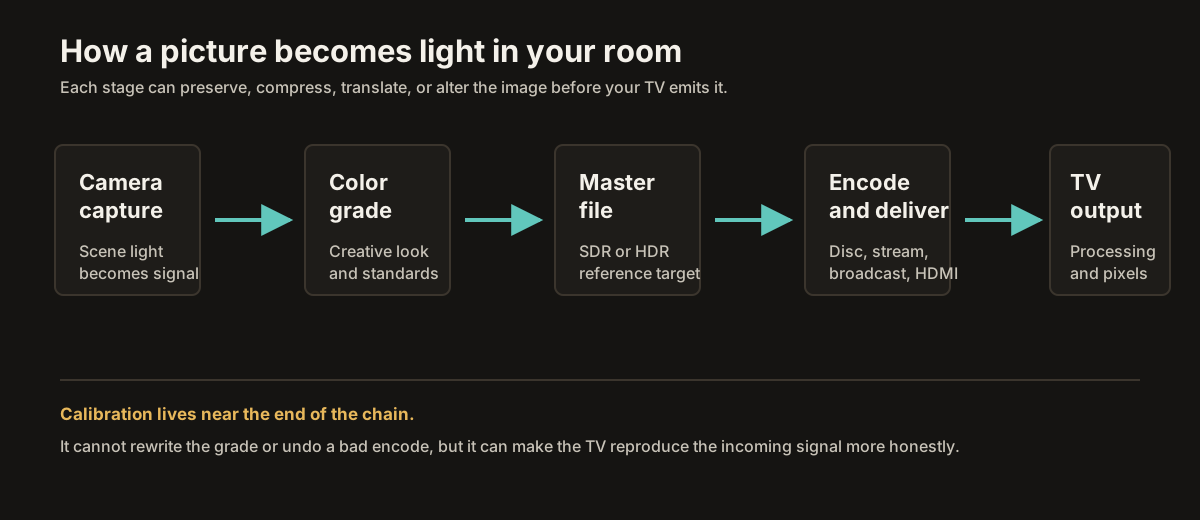
The journey has three big movements: capture, finishing, and delivery. The colorist sits near the boundary between the second and third - usually the last major creative stop before the image becomes a deliverable. Everything before that room is preparation. Everything after it is reproduction.
Capture
A modern cinema camera does not actually capture what most people think of as a finished image. It captures data - as much data as the sensor can record, in a deliberately flat, undramatic-looking form designed to give later stages the maximum room to work.
Most cinema cameras - an ARRI Alexa, a RED V-Raptor, a Sony Venice - record in either log or raw. Log encoding compresses the camera's huge dynamic range, the difference between the deepest shadow and the brightest highlight it can see, into a digital signal that avoids clipping highlights or crushing shadows too early. On a normal monitor, the result looks unimpressive: flat, low-contrast, and desaturated.
That is not a mistake. That is the point.
A log image is a wide, neutral container, with highlight detail and shadow detail preserved for later decisions. It will look beautiful later, after a colorist has graded it. On set, it just has to preserve the information.
So that nobody on set has to stare at a flat gray image, the camera or monitoring system applies a LUT - a lookup table - for on-set viewing. The LUT is essentially a preview transform: a way of showing the director, cinematographer, and crew what the image may roughly look like once it has been graded. It lets them frame, light, and judge performances with something closer to a finished picture on their monitors.
But the data being recorded is still the source material. The attractive image on the on-set monitor is a preview. The file on the drive is what the rest of the process will work from.
Already, before a single frame has left the set, decisions have been made that constrain everything downstream. The choice of camera and lens. The exposure. The white balance. The chosen log curve and color science. Each manufacturer has its own system - ARRI Log C, RED Log3G10, Sony S-Log3. These are the raw materials. They cannot be undone later. Calibration will not reach back here; this part of the journey is settled before the cameras even wrap.
Finishing
After the shoot, the footage moves to post-production. An editor cuts the film together, often using proxy versions of the original camera files - lower-resolution stand-ins that are easier to work with - while the original files remain preserved for finishing. Editorial decisions happen here, but the editor is mainly shaping the story, not the final look.
When the cut is locked, the project moves to a colorist. This is the room we visited in the first piece on this site. The colorist is the person who takes the captured image and gives it its finished appearance.
Working in software like DaVinci Resolve or Baselight, sitting in front of a calibrated reference monitor in a controlled room, the colorist takes the flat log footage from the camera and shapes it shot by shot. They balance the contrast of a face. They warm the temperature of an interior. They cool the shadows of an exterior. They match a wide shot to its close-up so the cuts feel invisible.
On major productions, this can take weeks. The director, cinematographer, studio, or finishing team may attend, give notes, ask for changes, and approve the result. Eventually they agree: this is what the movie looks like.
What the colorist sees on the reference monitor is, from this point on, the approved image. The artifact. The version of the film that everything else is supposed to reproduce.
But the colorist usually does not deliver one file. They deliver several.
There is an SDR master, graded in Rec.709, the standard color space for HDTV and SDR video for roughly three decades. That version goes to broadcast, airline screens, older streaming pipelines, and anywhere a viewer may still be watching on a non-HDR display.
There is often an HDR master, usually using PQ, wider color encoding, and much more headroom for highlights. That version goes to UHD Blu-ray and to streaming services that support HDR. There may also be a Dolby Vision version, which carries dynamic metadata that helps compatible displays tone-map the image scene by scene, or even shot by shot, for different display capabilities.
Each of those masters is made deliberately. The colorist makes specific choices about how the HDR version differs from the SDR version: where to use the extra brightness, where to hold back, how to keep faces and skin from looking strange when highlights bloom, and how to preserve the feeling of the scene across different display targets.
None of these versions is the "real" version while the others are mere compromises. They are all expressions of the creative intent, made for different delivery systems. When you pick HDR or SDR on your streaming app, you are choosing which of those graded masters to receive.
That is the end of finishing.
Whatever leaves this room - the SDR master, the HDR master, the Dolby Vision version, the platform deliverables - carries the major creative decisions. From this moment forward, the image is mostly in the hands of technical systems: packaging, encoding, delivery, decoding, display processing, and room conditions. All of them are trying, with varying degrees of success, not to pull the picture away from the approved master.
Delivery
The master arrives at a distributor - a streaming service, a Blu-ray authoring house, a broadcast network, a theatrical distributor. None of them ship the master file directly to viewers. The master is enormous: a feature-length 4K HDR master can run hundreds of gigabytes, far too much to stream casually over an internet connection or fit directly onto a consumer disc without compression.
So they encode it.
Encoding is the process of compressing the video file using a codec - H.264, HEVC, AV1 - to a much smaller size. This is where one of the biggest quality differences in modern home video lives, because most consumer delivery compression is lossy. Information is thrown away to fit the file under a target bitrate, and the codec works very hard to make that loss difficult to see.
A UHD Blu-ray of a 4K HDR film may run many times higher in bitrate than a typical 4K stream. A disc might use something like 60 to 100 megabits per second for video, depending on the title and encode. A streaming version of the same film might use 15 to 25 megabits per second, sometimes less, sometimes more, depending on the service, codec, device, and connection.
On a good display, you can sometimes see the difference: more banding in skies, more smearing in dark detail, more loss of fine texture. Not catastrophically; modern codecs are remarkable at hiding their work. But measurably, and sometimes visibly to anyone who knows where to look.
Each distribution path involves more handoffs. A streaming service uploads the encoded file to a content delivery network, which replicates it across servers around the world so the bits do not have to travel from one central location to every viewer's house. Your streaming app authenticates, requests the file, receives it in chunks, decodes it back into video frames in real time, and sends those frames to your TV or playback device.
A Blu-ray takes a more direct path: the disc holds the encoded file, your player decodes it, and the frames go over HDMI. Cable and over-the-air broadcast take their own paths, each with their own compression budgets, sometimes tighter than physical media and sometimes different from streaming.
The HDMI connection is its own minor technical drama. When your player and your TV connect, they negotiate. What resolution is being sent? What color format? What bit depth? What frame rate? Is HDR metadata present? Is the metadata static, as in HDR10, or dynamic, as in HDR10+ or Dolby Vision? What chroma subsampling is being used?
The TV's input has to interpret all of this correctly, in real time, frame after frame. Most of the time it does. Occasionally, something in the chain gets confused: the app, the player, the HDMI handshake, the TV input, or the TV's picture mode. That is one reason you sometimes see a movie that looks suspiciously washed out, or a sports broadcast where the colors seem off. Somewhere in the chain, the signal may be getting interpreted under the wrong assumptions.
Once the signal is in the TV, the TV is in charge. And before it lights up a single pixel, the TV does a remarkable amount of work on what it has been given.
It applies a picture mode - Standard, Vivid, Cinema, Filmmaker - each of which is a stack of preset choices about color, contrast, brightness, and processing. It maps the incoming color space to the panel's capabilities. If the content is HDR and brighter than the panel can reproduce, it tone-maps the highlights down to fit. It may apply motion interpolation, dynamic contrast, edge enhancement, noise reduction, color saturation boosts, or other "enhancements."
By the time the panel actually emits light, the image may have been transformed again - sometimes subtly, sometimes substantially, depending on settings most viewers never touch.
This is where calibration finally lives.
Every step we have walked through up to this point - the camera, the grade, the master, the encode, the distribution - is settled. None of it is something you can change in your living room. But the TV's behavior is yours to govern. You can choose which picture mode it uses, what processing it applies, how it interprets the standards, and how closely its panel follows the reference the colorist worked from.
Calibration is the practice of making those choices well, so that the work that survived the whole journey to reach you arrives as intact as possible.
The viewer
There is one more handoff after the panel: the room.
Light leaves the screen and travels through the air of your living room. Some of it reflects off your walls and comes back at you from oblique angles. Ambient light from a window or lamp lands on the screen and partially overwhelms the darker parts of the image. Your eye, sitting wherever it sits, has its own adaptation state - bright room, dim room, just came in from outside.
Your perception of what the screen is showing is shaped, in subtle but real ways, by all of these things.
This is why mastering rooms are dim and neutral. It is why Filmmaker Mode exists as a setting: to reduce unwanted processing and preserve things like the source frame rate, aspect ratio, color, and white point as closely as the TV allows. It is also why the calibration arc on this site will spend time on bias lighting and ambient light control before it ever gets too deep into a TV menu.
The journey does not actually end at the panel. It ends in your eye, in your room, under your conditions. Match those conditions, even roughly, to the ones the colorist worked under, and you give yourself a better chance of seeing what they saw.
So here is the picture, finally complete.
A camera on a set turned light into numbers. An editor assembled the numbers into a story. A colorist graded the numbers into a look. A mastering process turned that look into deliverables. An encoder compressed those deliverables for transmission. A network shipped them to your house. A box or app decoded them. Your TV translated them into pixel commands. Your panel turned the commands into light. Your eye, in your room, turned the light back into vision.
Most of that chain you cannot touch.
The last two links - what your TV does, and what your room is like - are yours.
Which is to say: the place in the journey where many home viewers are losing the picture is also the only place they have any power to fix it.
That is what the rest of the site will help you do.
Next: What Your TV Is Really Doing to the Picture Move from the image pipeline into the decisions your television makes before the panel emits light.