The Geometry of TV Color
If human color vision starts with three cone channels, then color can be described with three numbers. Not perfectly, not universally, and not in a way that captures every complexity of perception, but well enough to build an entire video system around it.
That is the foundation of color in television. Every color space, every gamut diagram, every "Color Space" or "Color Gamut" setting in a TV menu rests on the same basic idea: a display does not need to reproduce the full spectrum of the original light. It needs to produce a stimulus that a typical human visual system will accept as the intended color.
The famous color diagram - the horseshoe-shaped one with triangles drawn inside it - is the engineering map that grew out of that idea. It does not show brightness. It does not show every possible detail of human color experience. It shows chromaticity: hue and saturation, separated from luminance, for a standardized model of human color matching.
Once you understand that diagram, the rest of TV color becomes much easier to see. Rec. 709, DCI-P3, Display P3, Rec. 2020, Native, Auto - these stop being menu jargon and become triangles on a map.
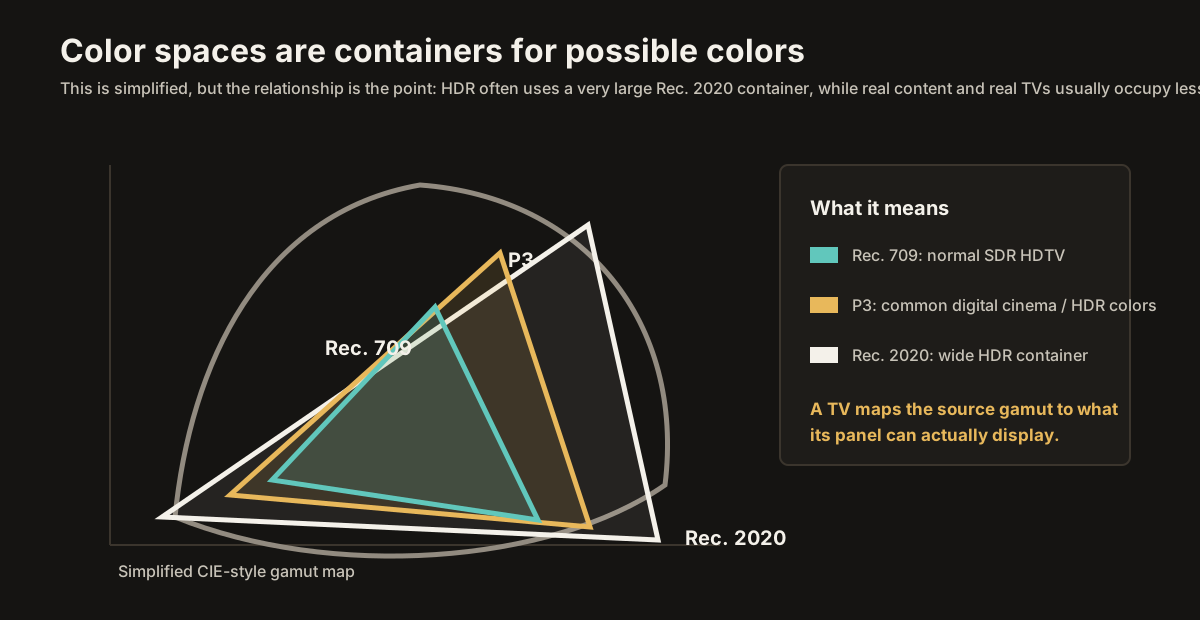
This piece is the geometry of color: where the diagrams come from, what they mean, and what they imply for the display sitting in your living room.
Color space is closely tied to HDR formats, TV color settings, and the way chroma subsampling carries color detail through the signal chain.
The Wright and Guild experiments
In the late 1920s, two British researchers, William David Wright and John Guild, working separately, helped produce the experimental data that became the foundation of modern colorimetry.
The basic setup was elegant. A viewer looked into an apparatus showing a small circular field split into two halves. On one side was a test color, often a single wavelength of light. On the other side was a mixture of three primary lights. The viewer adjusted the amounts of those primaries until the two halves appeared identical.
Same hue. Same brightness. No visible difference.
The experimenters repeated this across wavelengths and observers, recording how much of each primary was needed to match each test color. The result was a set of color-matching data: for this wavelength, a typical observer needs this much of primary one, this much of primary two, and this much of primary three to create a visual match.
There was one complication, and it matters. Some wavelengths could not be matched using only positive amounts of the chosen primaries. The mixture would always be a little wrong - too pale, too shifted, not saturated enough. The workaround was to add one of the primaries to the test side instead of the matching side. Mathematically, that is equivalent to using a negative amount of that primary in the match.
No real light has negative intensity. The negative values were not physical cone responses. They were a consequence of the particular real primaries chosen for the experiment. But they revealed something important: human color matching has a geometry, and real primaries do not automatically span all of it in a simple positive way.
In 1931, the CIE - the international body for lighting and color - used this kind of color-matching work to define the CIE 1931 standard observer. That "observer" is not a person. It is a mathematical model of average human color-matching behavior under specific viewing conditions.
The CIE also transformed the original matching data into a more convenient coordinate system called XYZ. The XYZ system uses imaginary primaries, chosen for mathematical usefulness rather than physical display. The Y component was arranged to correspond to luminance, which makes the system especially useful for measurement.
Out of this came the CIE 1931 color space and, more famously, the two-dimensional CIE chromaticity diagram.
That diagram is the one you have probably seen. It is worth knowing what it actually shows.
The horseshoe
Picture a flat coordinate plane. The horizontal axis is x. The vertical axis is y. On that plane, the CIE chromaticity diagram plots colors by chromaticity - roughly, hue and saturation with brightness factored out.
The valid region forms a curved shape often described as a horseshoe or a sail. The curved outer boundary traces the chromaticities of spectral colors: colors produced by single wavelengths of light. Starting near the lower right, the curve runs from deep red through orange, yellow, green, cyan, blue, and violet as it moves around the boundary.
The straight line closing the bottom of the shape is called the line of purples. Those colors - magentas, purples, and related hues - do not correspond to any single wavelength of light. They are produced by mixtures from opposite ends of the spectrum, especially red and violet.
The interior contains the chromaticities produced by mixtures of light. Move from the boundary toward the middle, and colors become less saturated. A highly saturated red near the edge becomes a softer red, then pinkish, then eventually neutral as it approaches the white region.
For video, the important white point is usually D65, with chromaticity coordinates around x = 0.3127, y = 0.3290. That is the standard white used by Rec. 709, sRGB, Rec. 2020, and most modern video workflows. It is not "the one true white" in nature. It is the agreed reference white for the system.
The CIE 1931 diagram is powerful, but it has limitations.
First, it is two-dimensional. Brightness has been removed. A dim red and a bright red can sit at the same chromaticity point even though they are very different visual experiences.
Second, it is based on a standard observer, not every observer. Real people vary.
Third, it is not perceptually uniform. A small distance in one part of the diagram does not necessarily look like the same amount of color difference as the same distance somewhere else. The green region gets a lot of map space. Blue regions are compressed. Later systems, including CIE 1976 u'v' and CIELAB, were designed to make color differences behave more evenly for measurement work.
Still, the 1931 diagram remains the familiar map. It is the picture on which video gamuts are usually drawn.
For our purposes, the question is simple: inside that horseshoe, what part can your TV actually reach?
The triangle in the horseshoe
A television display has three primary colors: red, green, and blue.
Each primary has a chromaticity. The red subpixel emits light with a particular spectrum, and that light lands at a particular point on the CIE diagram. The green primary lands somewhere else. The blue primary lands at a third point.
Draw lines connecting those three points and you get a triangle.
That triangle is the display's color gamut, at least in the simplified two-dimensional chromaticity sense. By mixing its red, green, and blue primaries in different amounts, the display can produce colors inside that triangle. It can produce colors along the edges. It can produce colors in the middle. But it cannot produce chromaticities outside the triangle.
That is a physical limit. A display cannot reproduce a color outside its gamut just by trying harder. If a source asks for a deeply saturated green that lies outside the display's triangle, the TV has to compromise. It may clip the color to the nearest available edge. It may compress a range of colors inward. It may shift the color slightly to preserve relationships. But it cannot show the original out-of-gamut color exactly.
This is why gamut matters.
It is also why no real three-primary display can cover the entire horseshoe. The spectral boundary is curved, while a three-primary display produces a triangle. A triangle can cover a large region, but it cannot perfectly fill that curved shape using three physically real primaries. There will always be visible colors outside the triangle, especially near the most saturated parts of the spectral boundary.
A wider-gamut display simply draws a bigger triangle. It reaches farther into the horseshoe. It can reproduce more saturated colors. But even a very wide triangle is still a triangle.
The triangles that matter
Strictly speaking, a color space is more than a triangle. It includes primaries, a white point, transfer functions, encoding rules, and other assumptions. But in everyday TV language, people often use "color space" to mean the gamut triangle. That is the part we are focusing on here.
For modern home video, three gamuts matter most: Rec. 709, P3, and Rec. 2020.
Rec. 709
Rec. 709 is the standard color space for high-definition SDR video.
Its triangle is relatively small by modern standards. The primaries sit well inside the CIE horseshoe rather than close to the spectral boundary. That was not a mistake. Rec. 709 was a practical HDTV standard built around displays that could realistically be made and matched.
Most HD SDR video is Rec. 709: broadcast HDTV, Blu-ray, and most non-HDR streaming video. Standard-definition material has its own older colorimetry, often associated with Rec. 601, but once you are dealing with HD SDR video, Rec. 709 is the usual target.
Rec. 709 also shares its red, green, and blue primary chromaticities, and its D65 white point, with sRGB, the standard color space of the web and most computer imagery. That shared ancestry is why Rec. 709 and sRGB often look similar in gamut diagrams.
But they are not identical systems. Their transfer functions and viewing assumptions differ. Same primaries does not mean same whole color space.
P3
P3 is a wider gamut than Rec. 709. It was developed for digital cinema, where projection systems could reproduce a larger range of colors than the older HDTV standard.
The red primary reaches farther. The green primary reaches farther. The blue primary is similar to Rec. 709's blue. The result is a larger triangle, especially useful for richer reds, oranges, yellows, and greens.
Here the terminology gets messy.
DCI-P3 is the theatrical digital-cinema version. It uses P3 primaries, a cinema white point, and a 2.6 gamma environment suited to dark theatrical projection.
Display P3 is a consumer/display-oriented variant. It uses the same P3 primaries but pairs them with a D65 white point and an sRGB-style transfer function. Apple displays, phones, tablets, and many modern computer workflows use Display P3.
Home-video HDR often uses another practical arrangement: P3-like mastering inside a Rec. 2020 container. In other words, the signal may be encoded as Rec. 2020, but much of the actual creative color work sits inside the smaller P3 region because that is what many professional and consumer displays can reproduce more reliably.
So when someone says a TV has "98% P3 coverage," they are talking about how much of the P3 triangle the display can reproduce. That is a useful number, because P3 is still the practical wide-gamut target for much HDR content.
Rec. 2020
Rec. 2020 is much wider than either Rec. 709 or P3.
It was defined for ultra-high-definition television and uses primaries placed very close to the edge of the CIE diagram. Its green primary, especially, reaches far beyond what Rec. 709 and P3 can cover. As a result, Rec. 2020 encloses a very large portion of the visible chromaticity diagram.
That does not mean your TV can display all of it.
Rec. 2020 is more of a forward-looking container than a gamut most consumer displays can fully reproduce. HDR signals are often carried with Rec. 2020 colorimetry, but the actual colors in the program may occupy a smaller region, often closer to P3. The container is large enough for today's content and tomorrow's displays.
This is why Rec. 2020 can be confusing. A signal can be "Rec. 2020" without using colors all the way out to the Rec. 2020 primaries. The coordinates live in the Rec. 2020 system, but the content itself may stay mostly inside P3.
That distinction matters when you are trying to understand what your TV is doing. The TV receives a signal described in one color space. It has its own physical gamut. It must map one into the other.
That mapping is color management.
The setting in your menu
Now the geometry lands in your TV menu.
Somewhere under Advanced Picture Settings, Expert Settings, Color, Color Gamut, or Color Space, your TV may offer choices like Auto, Native, Rec. 709, DCI-P3, BT.2020, or similar manufacturer-specific labels.
What that setting is really asking is: which color system should the TV use when interpreting the incoming numbers?
The video signal contains numbers. Those numbers only become specific colors when interpreted through a color space. A red value in Rec. 709 does not mean the same physical color as the same numerical red value in Rec. 2020. The number is only half the story. The color space gives the number its meaning.
If the TV interprets Rec. 709 content as if it were wide-gamut content, colors become oversaturated. Skin tones push too red or orange. Grass becomes neon. Everything looks more vivid, but not more correct.
If the TV interprets wide-gamut HDR content as if it were Rec. 709, colors can become compressed, dull, or shifted. The content was asking for a larger triangle, and the TV is using the wrong map.
For most viewers, the correct setting is Auto.
Auto lets the TV choose the correct color handling based on the source signal, the content type, and the metadata or signaling available in the chain. SDR HD content should be treated as Rec. 709. HDR content should usually be treated as Rec. 2020, often with actual colors that sit mostly within P3. The viewer should not have to switch these manually every time the content changes.
Manual settings exist for problem cases: older sources, unusual players, bad metadata, test patterns, calibration work, or signal chains where the TV guesses wrong. But as a default, forcing a color space usually creates more problems than it solves.
Then there is Native.
Native means something different from Auto. Native usually tells the TV to use the panel's own widest available primaries without restricting them to the content's intended gamut. On a wide-gamut TV showing Rec. 709 content, Native often produces oversaturated color. The TV is no longer holding the panel back to the smaller Rec. 709 triangle. It is letting the panel stretch those numbers out toward its physical limits.
Some viewers like that look. It can be colorful and exciting. But it is not faithful to the content. The colorist graded the image inside a specific triangle. Native changes the triangle after the fact.
Native is not accuracy. It is more color.
The right answer
The whole story can be reduced to one picture: a horseshoe with triangles inside it.
The horseshoe is the standard map of human chromaticity. Rec. 709 is a small triangle. P3 is a larger triangle. Rec. 2020 is a much larger triangle. Your TV has its own physical triangle. Every piece of content was created with one of those systems in mind.
The job of the TV is not to make every triangle as large as possible. The job is to respect the triangle the content was made for, then map it as gracefully as possible to the triangle the display can actually produce.
That is why color space settings matter. That is why Auto is usually right. That is why Native is usually wrong for accuracy. And that is why wide color gamut is not automatically better unless the TV also knows when not to use it.
The triangle is the boundary of what a display can show.
The standard is the boundary the content was made for.
Good color management is what keeps those two ideas from fighting each other.
Next: Why Warm 2 Looks Yellow Move from color-space geometry into the reference white point that anchors the whole picture.